

Почему только Алиса
На российском рынке рекламные блоки внутри AI-ответов сейчас есть только у Алисы. У других нейросетей (ChatGPT, Gemini, Perplexity) рекламы в ответах нет, поэтому весь раздел построен на данных от Алисы. У самого Яндекса пока нет отдельной настройки «продвигать объявление в Алисе AI». Объявления подхватываются автоматически, и по нашим данным можно увидеть, какие именно и от кого туда залетают.
Сводка наверху
В шапке три карточки с ключевыми числами:
- Ответы с рекламой. Ответы с рекламой: сколько уникальных ответов содержат рекламные блоки и какая это доля от общего числа ответов.
- Уникальных доменов. Уникальных доменов: сколько разных доменов хотя бы раз появлялось в рекламных блоках.
- Конкурентная реклама. Конкурентная реклама: сколько раз в рекламных блоках встречался домен ваших конкурентов.
Три вкладки
Дальше идут три вкладки: топ доменов, динамика по дням и таблица всех блоков.
1. Топ доменов рекламы
Горизонтальная диаграмма с топ-20 доменами, которые чаще всего попадали в рекламные блоки Алисы. Каждый домен раскрашен по типу: наши, конкуренты и прочие. Сразу видно, кто занимает рекламные позиции в вашей нише.
Диаграмма кликабельная. По клику на сегмент открывается окно с конкретными объявлениями этого домена: заголовок, текст, URL, ссылка-источник, по какому запросу нашли и дата. Удобно посмотреть, как именно выглядят рекламные блоки у конкретного бренда.
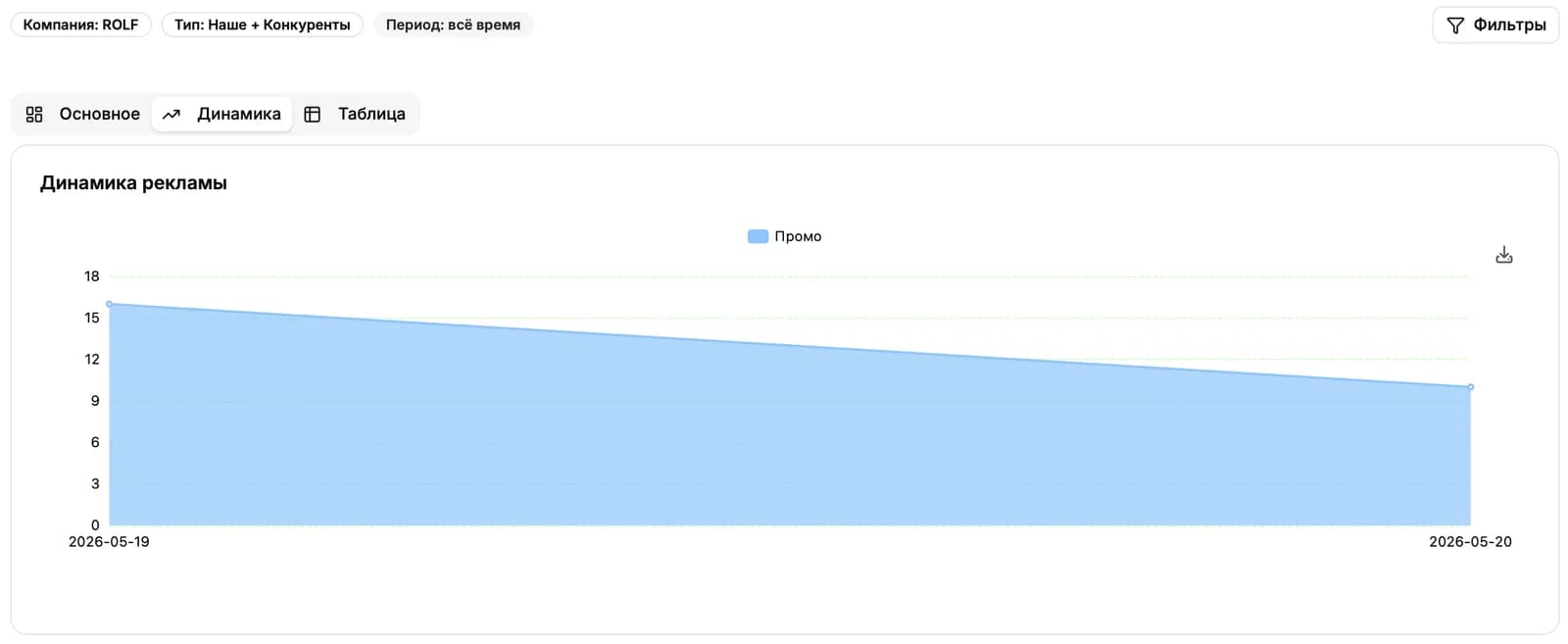
2. Динамика
Линейный график рекламных блоков по дням. Видно, в какие даты рекламная активность в Алисе резко вырастает или падает. Полезно, чтобы заметить волны конкурентных кампаний или собственный всплеск.
3. Таблица
Самая детальная вкладка. Каждая строка это конкретный рекламный блок из ответа Алисы.
Что в колонках
- Домен. Домен и фавикон. Кликом открывается сайт в новой вкладке.
- Тип. Тип: «Наше», «Конкуренты» или «Другое».
- Заголовок. Заголовок объявления.
- Текст. Текст самого объявления.
- URL. URL посадочной страницы.
- Источник. Источник, в данном случае всегда «Поиск с Алисой».
- Ссылки. Количество быстрых ссылок (sitelinks) внутри объявления.
- Дата. Дата, когда блок был замечен.
- Запрос. Поисковый запрос, по которому реклама показалась в ответе Алисы.
Поиск
Над таблицей есть поиск с выбором области: везде сразу, только по домену, только по URL, по заголовку или по тексту объявления. Удобно искать конкретное объявление или находить все блоки конкретного бренда.
Фильтры
Слева доступны фильтры:
- Компания. Компания, по которой смотрим рекламу.
- Продукт. Конкретный продукт компании, если у компании их несколько.
- Кластеры. Кластеры запросов. Удобно сузить картину до одной тематики.
- Тип рекламы. Тип рекламы: «Наше», «Конкуренты», «Наше плюс конкуренты» или «Другое». Помогает быстро отделить свой рекламный поток от чужого.
- Период. Временной диапазон: 24 часа, 7 дней, 30 дней или весь срок.
Зачем это нужно
Раздел показывает реальные паттерны попадания в рекламные блоки Алисы. По нему можно понять, какие конкуренты регулярно занимают рекламные позиции по вашим запросам, какие тексты и заголовки они используют, и попадаете ли в эти блоки вы сами. Это особенно ценно, потому что в самом Яндексе сейчас нет ручного управления показом в Алисе AI: всё уходит туда автоматически из общей рекламной воронки.
Дальше читать
Не нашли ответ?
Напишите нам - отвечаем по будням в течение нескольких часов.