

На каких запросах строится аналитика
Все цифры в этом разделе считаются по нейтральным запросам. Это запросы без упоминания бренда в самой формулировке, например «лучший банк для бизнеса». Именно по ним видно, кого нейросети рекомендуют, когда о вас ещё не знают.
Сравнительные и негативные запросы по умолчанию не учитываются. Они дают другой срез картины (прямое сравнение или критика) и работают в своих отдельных отчётах.
Фильтры
Слева доступна панель фильтров. Через неё вы сужаете данные до нужного среза.
- Компания. Компания, по которой считаем аналитику.
- Продукт. Продукт компании (если у компании их несколько).
- Нейросети. Нейросети. Можно выбрать одну, несколько или все доступные.
- Кластеры. Кластеры запросов. Можно комбинировать несколько кластеров.
- Период. Период: 24 часа, 7 дней, 30 дней или весь срок наблюдения.
- Только нейтральные. Переключатель «Только нейтральные» включён по умолчанию. Если выключить, в аналитику попадут также сравнительные и негативные запросы.
- Метрика. Метрика по умолчанию: «Ответы». Можно переключить на «Упоминания».
Упоминание и ответ: в чём разница
В одном ответе нейросети ваш бренд может прозвучать несколько раз: например, в тексте, в списке преимуществ и в подписи к ссылке. Это будет 5 упоминаний, но всего 1 ответ.
Упоминания делятся на два типа:
- Упоминание бренда - название встречается в самом тексте ответа.
- Упоминание в ссылке - нейросеть приложила ссылку, ведущую на сайт бренда.
Большинство виджетов раздела позволяет переключаться между режимами «По упоминаниям» и «По ответам», чтобы видеть картину с двух сторон.
Виджеты раздела
Дальше идут восемь основных виджетов. Каждый отвечает на свой вопрос про конкурентов.
Лидерборд
Топ брендов: ваш и конкурентов. Переключатель «Упоминания / Ответы» меняет логику счёта. Внутри каждой строки сразу видно, сколько было упоминаний в самом тексте и сколько в ссылках. По клику на строку открывается предпросмотр запросов с фильтром «Упоминания бренда / Упоминания ссылок / Оба типа в одном ответе».
Предпросмотр запросов
По клику на пункт лидерборда (или другого виджета) открывается окно «Предпросмотр запросов». Здесь видны конкретные запросы и ответы, по которым была посчитана метрика.
В шапке окна есть фильтры:
- «Упоминания бренда» - только те ответы, где бренд упомянут в тексте.
- «Упоминания в ссылках» - только ответы со ссылкой на сайт бренда.
- «Оба типа в одном ответе» - ответы, в которых бренд упомянут и в тексте, и в ссылке одновременно.
Фильтры можно комбинировать. Если ничего не выбрано, окно подскажет, что нужно отметить хотя бы один тип.
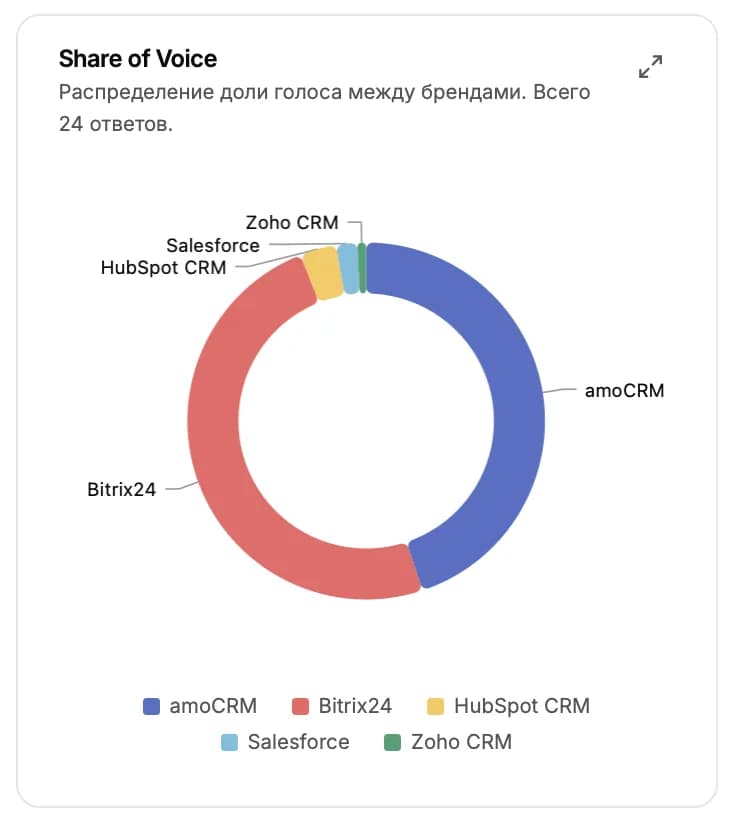
Share of Voice
Круговая диаграмма распределения голоса между брендами. Показывает, какую долю занимаете вы и какую - каждый конкурент. При наведении на сектор показывается количество ответов.
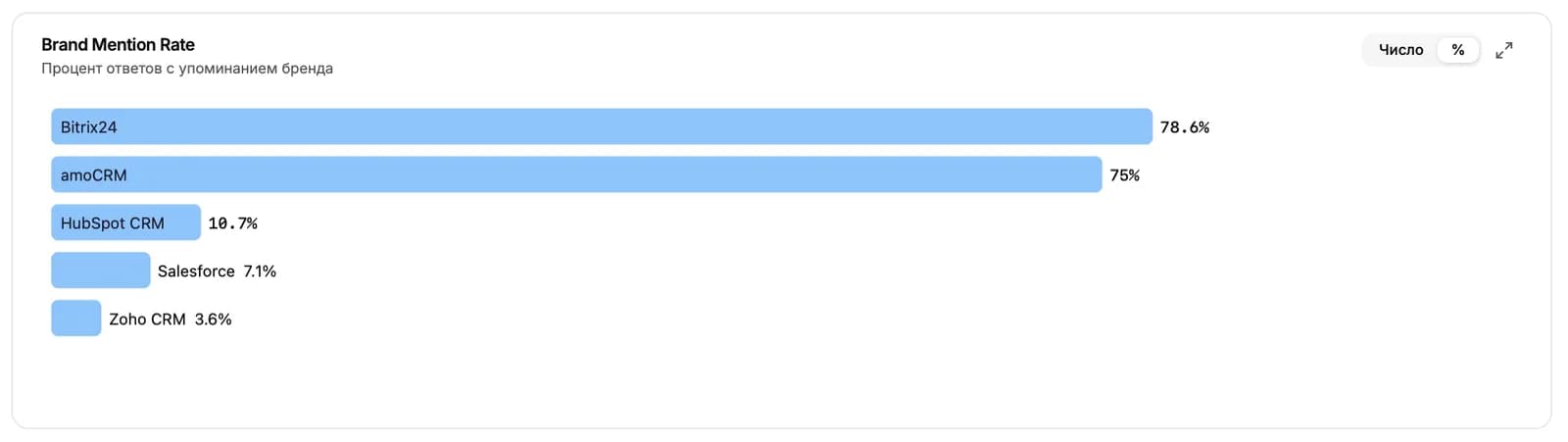
Brand Mention Rate
Доля ответов с упоминанием бренда от общего числа ответов. Два режима: число (сколько именно ответов) и процент (какая доля от всех ответов). Ключевая метрика для отслеживания присутствия бренда в нейросетях.
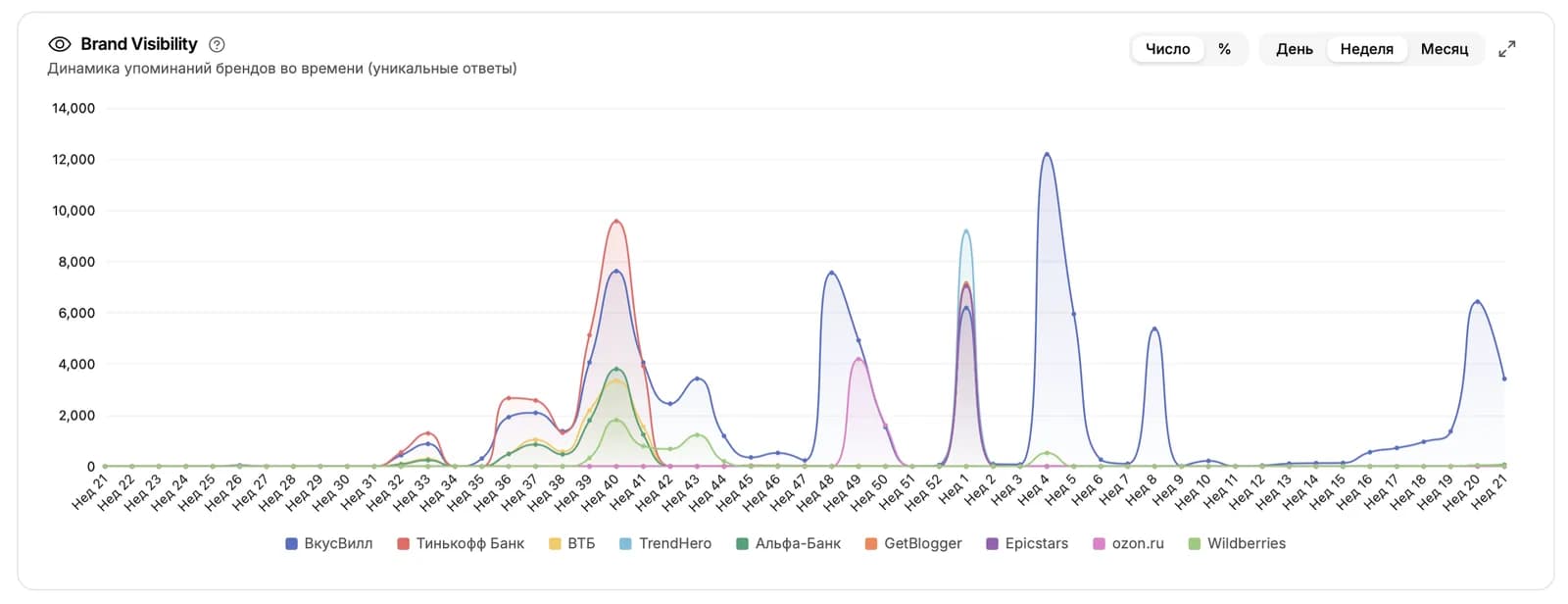
Brand Visibility
Динамика упоминаний во времени. Показывает, как менялось присутствие бренда и конкурентов день за днём. Гранулярность переключается: День, Неделя, Месяц.
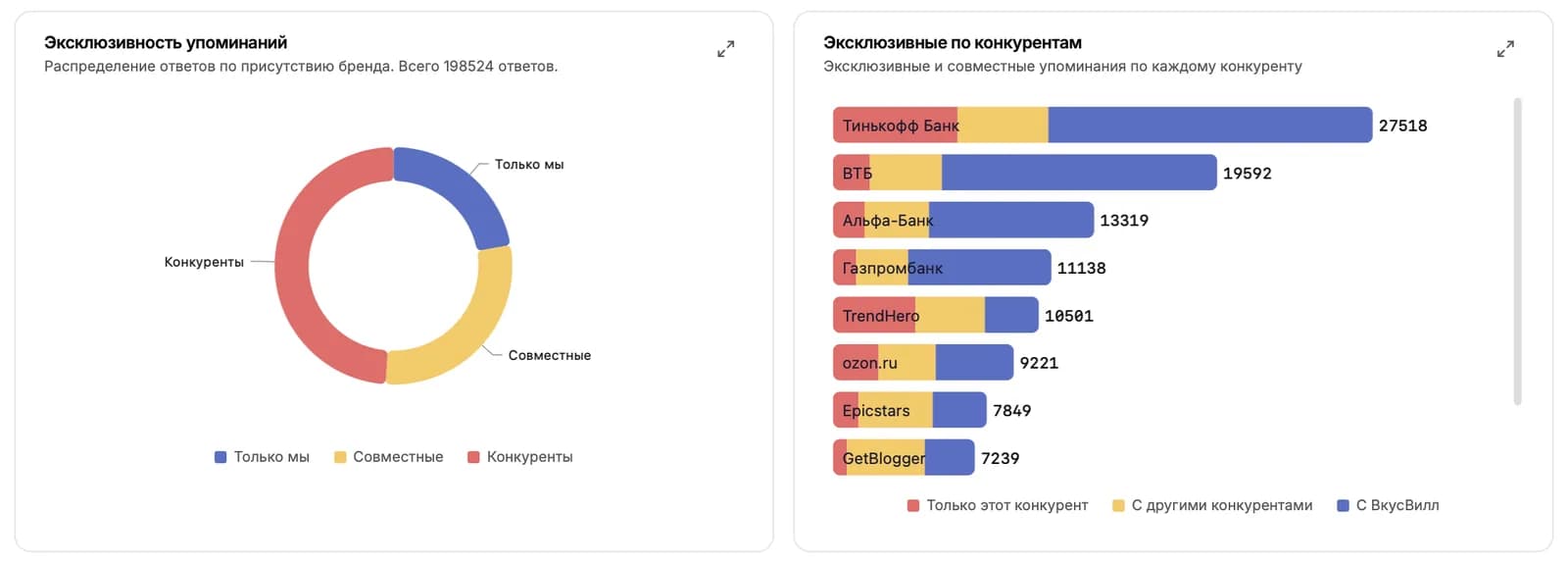
Эксклюзивность упоминаний
Три сегмента: «Только мы» (в ответе вы без конкурентов), «Совместно» (вы и кто-то из конкурентов), «Только конкуренты» (вас в ответе нет, есть конкуренты). Удобно увидеть, в каких ситуациях нейросети называют бренды по отдельности, а в каких - вместе.
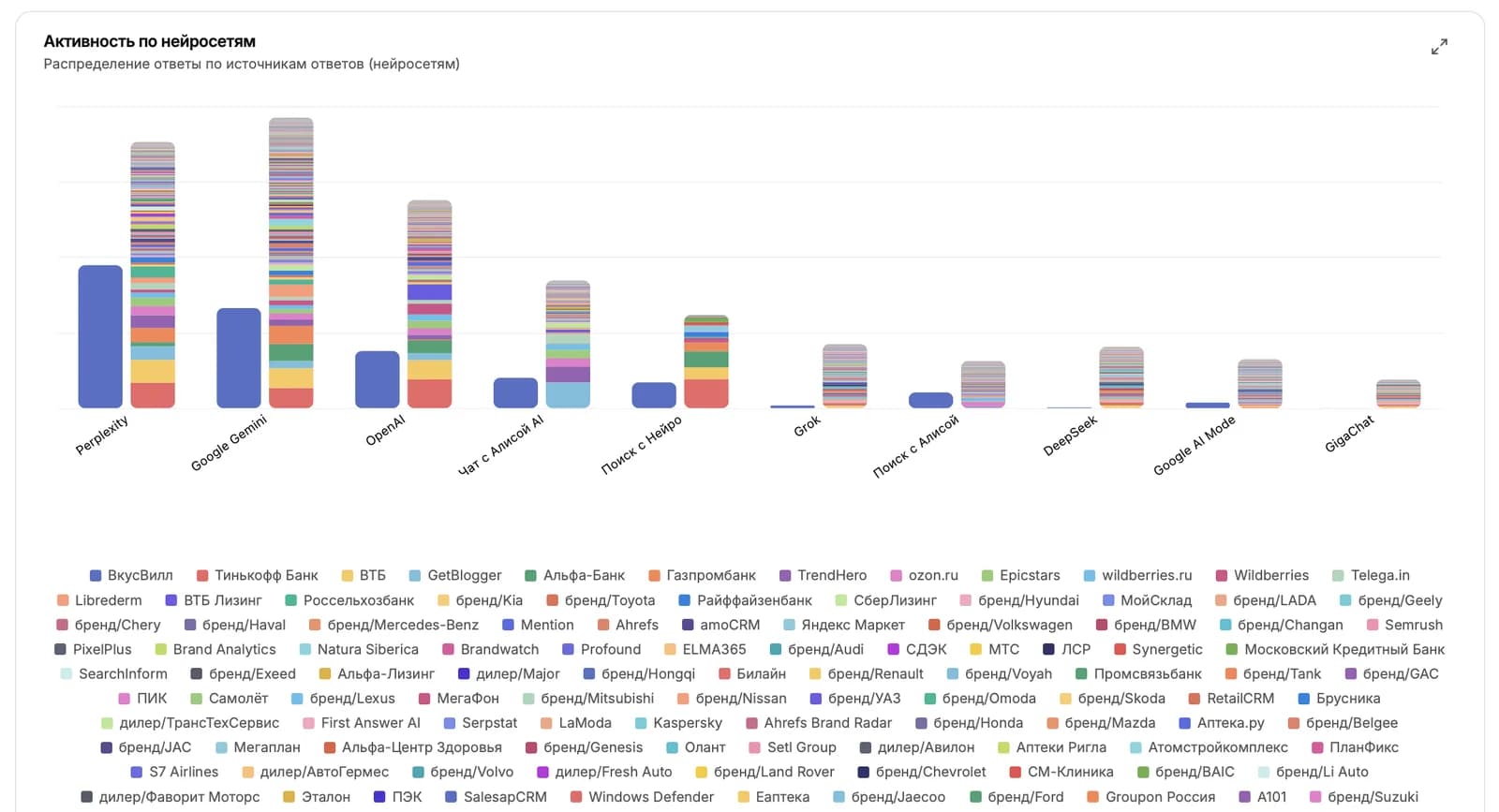
Активность по нейросетям
Распределение по каждой нейросети отдельно: где у вас сильные позиции, где конкуренты обходят, где вообще нет упоминаний. Полезно, чтобы решить, на какую нейросеть направить больше усилий по продвижению.
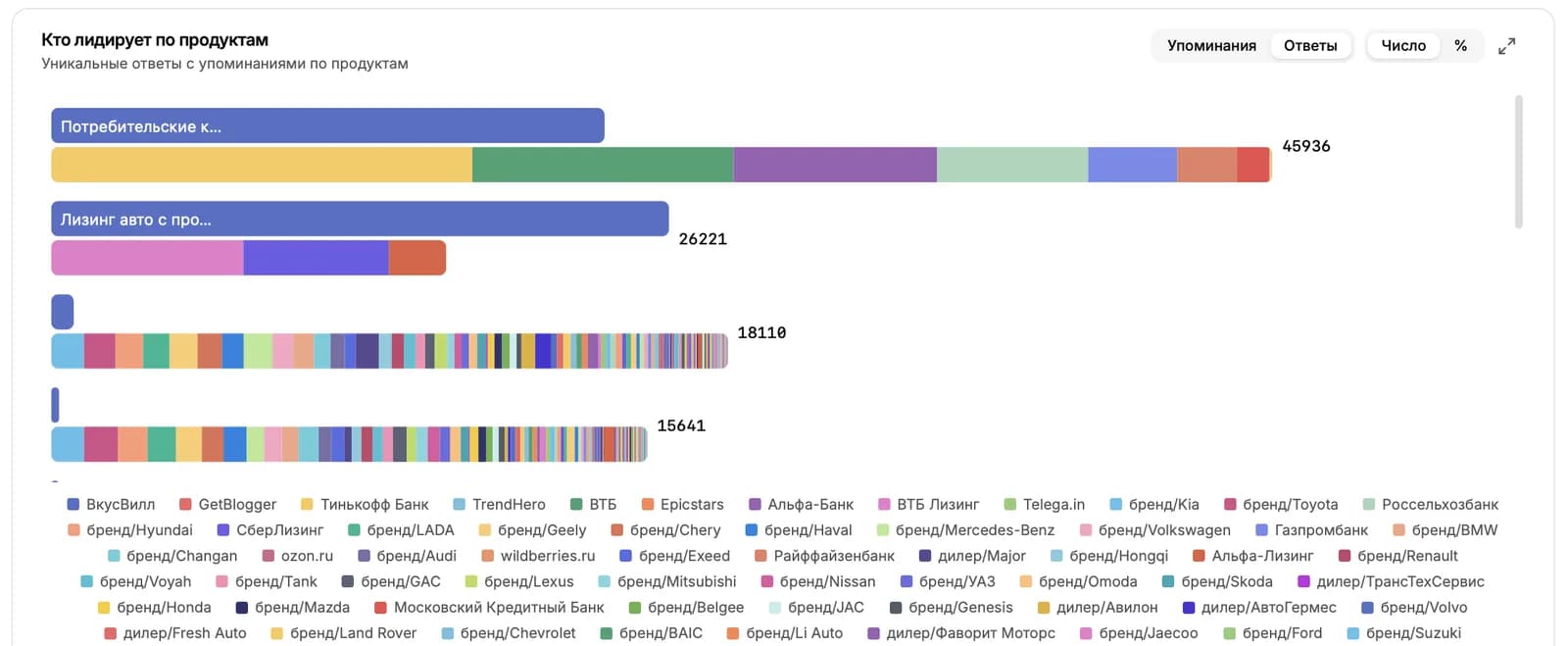
Кто лидирует по продуктам
Если в компании заведены продукты, этот виджет показывает лидеров по каждому продукту отдельно. Понятно, по каким продуктам вы сильны, а где есть провалы.
Дальше читать
Не нашли ответ?
Напишите нам - отвечаем по будням в течение нескольких часов.